Jupyter
Jupyter 简介
Jupyter 是一个开源的交互式计算环境,支持多种编程语言(如 Python、R、Julia 等)。它允许用户创建和共享文档,这些文档包含代码、方程式、可视化和文本。Jupyter Notebook 是 Jupyter 的核心组件,提供了一个基于 Web 的界面,用户可以在其中编写和执行代码。
Jupyter Notebook 与 JupyterLab 的区别
Jupyter Notebook 是经典的、老一代交互式笔记本环境。
JupyterLab 是现代化、模块化、可扩展的下一代 UI,功能更强、体验更好。
安装
# jupyter
pip install jupyterlab
jupyter lab

# notebook
pip install notebook
jupyter notebook
Jupyter Docker
https://jupyter-docker-stacks.readthedocs.io/en/latest/index.html
定义:Jupyter Docker Stacks是一组预先配置好的Docker镜像,这些镜像包含了Jupyter应用程序和交互式计算工具。 用途:用户可以利用这些镜像来实现多种功能,包括但不限于以下几种情况:
镜像选择
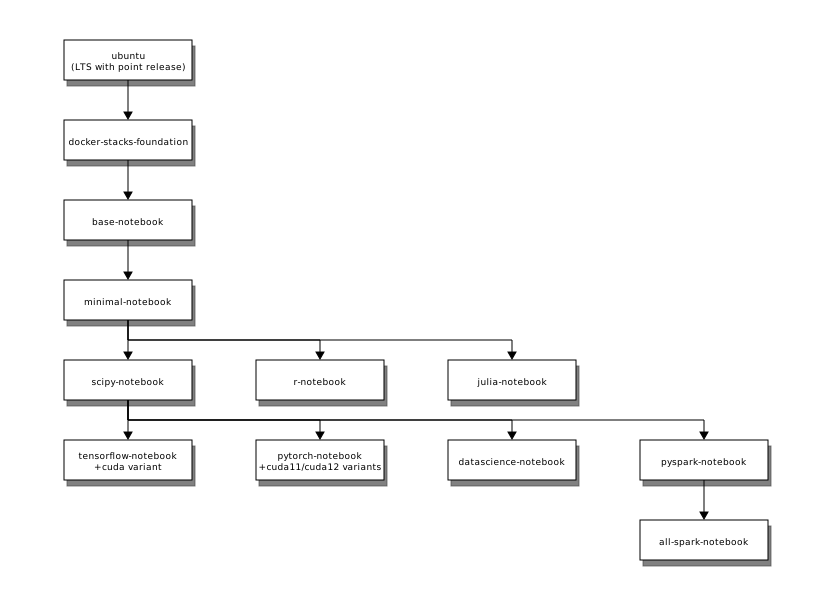
- jupyter/base-notebook:基础镜像,包含 Jupyter Notebook 和常用的 Python 库。
- jupyter/minimal-notebook:最小化的 Jupyter Notebook 环境,适用于需要自定义的用户。(Common useful utilities like curl, git, nano (actually nano-tiny), tzdata, unzip, and vi (actually vim-tiny),)
- jupyter/scipy-notebook:除了
minimal-notebook,还包含科学计算所需的库,如 NumPy、SciPy、Matplotlib 等。 - jupyter/tensorflow-notebook:除了
scipy-notebook,还包含 TensorFlow 和 Keras,适用于深度学习任务。 - jupyter/pyspark-notebook:除了
scipy-notebook,还包含 PySpark,适用于大数据处理和分析。 - jupyter/datascience-notebook:包含数据科学常用的库,如 Pandas、Scikit-learn 等。
运行
# 示例
docker run -d -p 8888:8888 --name notebook -v "${PWD}":/home/jovyan/work quay.io/jupyter/scipy-notebook:2025-03-14
docker start --attach -i notebook
docker rm notebook
docker-compose 示例:
version: '3.8'
services:
  jupyter:
    image: quay.io/jupyter/scipy-notebook:2025-03-14
    container_name: jupyter_notebook
    ports:
      - "8888:8888"
    volumes:
      - ./notebooks:/home/jovyan/work
    environment:
      - JUPYTER_ENABLE_LAB=yes
    restart: unless-stopped
配置
- base镜像中的启动脚本
start-notebook.py,start-singleuser.py
- 默认配置文件
# 生成 Jupyter Server 配置文件
jupyter server --generate-config
# 生成 Jupyter Notebook 配置文件
jupyter notebook --generate-config
# 生成 JupyterLab 配置文件
jupyter lab --generate-config
配置文件生成位置: ~/.jupyter/,常见配置项包括:
# 允许远程访问
c.ServerApp.allow_remote_access = True

# 设置 IP 地址
c.ServerApp.ip = '0.0.0.0'

# 设置端口
c.ServerApp.port = 8888

# 设置密码哈希
c.PasswordIdentityProvider.hashed_password = 'your_hashed_password_here'

# 禁用浏览器自动打开
c.ServerApp.open_browser = False

# 设置工作目录
c.ServerApp.root_dir = '/path/to/your/notebooks'

# 允许 root 用户运行(不推荐)
c.ServerApp.allow_root = True- 自定义密码
# 生成密码
python -c "from jupyter_server.auth import passwd; print(passwd())"
# 使用生成的密码运行容器
docker run -it --rm -p 8888:8888 quay.io/jupyter/base-notebook \ start-notebook.py --PasswordIdentityProvider.hashed_password='argon2:$argon2id$v=19$m=10240,t=10,p=8$JdAN3fe9J45NvK/EPuGCvA$O/tbxglbwRpOFuBNTYrymAEH6370Q2z+eS1eF4GM6Do'- base URL
docker run -it --rm -p 8888:8888 quay.io/jupyter/base-notebook \
    start-notebook.py --ServerApp.base_url=/customized/url/prefix/
使用https(自生生成):
-e GEN_CERT=yes- Instructs the startup script to generate a self-signed SSL certificate. Configures Jupyter Server to use it to accept encrypted HTTPS connections.自定义证书
docker run -it --rm -p 8888:8888 \
    -v /some/host/folder:/etc/ssl/notebook \
    quay.io/jupyter/base-notebook \
    start-notebook.py \
    --ServerApp.keyfile=/etc/ssl/notebook/notebook.key \
--ServerApp.certfile=/etc/ssl/notebook/notebook.crt- 使用其它命令启动:
-e DOCKER_STACKS_JUPYTER_CMD=<jupyter command>- Instructs the startup script to run jupyter ${DOCKER_STACKS_JUPYTER_CMD} instead of the default jupyter lab command. See Switching back to the classic notebook or using a different startup command for available options. This setting is helpful in container orchestration environments where setting environment variables is more straightforward than changing command line parameters.
| DOCKER_STACKS_JUPYTER_CMD | Frontend |
|---|---|
| lab (default) | JupyterLab |
| notebook | Jupyter Notebook |
| nbclassic | NbClassic |
| server | None |
| retro* | RetroLab |
完整示例
使用 JupyterLab 和自定义配置的完整 Docker Compose 示例:
# 生成密码
python -c "from jupyter_server.auth import passwd; print(passwd())"services:
jupyterlab:
image: quay.io/jupyter/scipy-notebook:2025-08-04
container_name: jupyterlab
ports:
- "8888:8888"
volumes:
- ./notebooks:/home/jovyan/work
environment:
- JUPYTER_ENABLE_LAB=yes
- DOCKER_STACKS_JUPYTER_CMD=lab
- GEN_CERT=yes
# 密码:yinqiwei
command: |
start-notebook.py --ServerApp.base_url=/jupyter/ --ServerApp.password='argon2:$$argon2id$$v=19$$m=10240,t=10,p=8$$BddMOiwDJ5A+lhIxQrkWdg$$T260ScvgWLnSNmB9f5nCcL1sOwOnFRZQplB++wVqQ5Q'
restart: unless-stoppeddocker compose up -d